About the Header Photograph

Showing posts with label Family Search Wiki. Show all posts

Sunday, September 1, 2013

Using The FS Wiki to Search in Various States


One thing that does work...The Family Search Wiki!

I just ran across this on the Family Search Wiki and wanted to share it with you.  This one feature alone makes using the Family Search Wiki a very good idea.  Nothing like finding just about everything you need for your particular state on one page full of links.  Once on the link below, Click on your state~it's great!

https://familysearch.org/learn/wiki/en/United_States

Below is a screen shot of what this looks like.   You will find it mid-page on the link.  Everything you could possibly need to get started is right there!


One step at a time we can learn
 this stuff and find success!
The Wiki Helps! 
We all have our mountains to climb.
I'll take genealogy any day over the one above! 
How about you?

Friday, August 9, 2013

Some Background on the Research Wiki


According to James L. Tanner in one of his classes at the Family History Expo in Sacramento this summer, "The Family Search Wiki is easily to most valuable genealogical resource on the Internet!"  That is a pretty bold statement but this man is incredibly knowledgeable about the Wiki and is one of its Arbitrators.  It made me sit up and take notice.

You can find it at familysearch.org. On the tool bar on the home page click on Search and you will find it on the tool bar there. Here is the path to it.  familysearch>search>wiki  The WIKI can be used free of charge as can the entire website familysearch.org. However, you do not even have to register or sign in to use the wiki. 


So what is a wiki exactly?  According to Mr. Tanner, a Wiki "is a website that allows the creation and linking of a large number of interrelated pages  in a collaborative environment where the wiki is constructed."    It is maintained by a community of users that allows any authorized user to add or edit content.  Sound familiar?  Our new Family Tree is a wiki platform program! Every page or article is considered open-ended and never finished.

A wiki website relies on its authorized users to supply content and edit what is there.  If you have expertise in a given area of family history or genealogy you should consider adding it to the Family Search Wiki.  Wiki articles are about places and methodology.  You cannot add information about a person.  Nor will you find your ancestors there.  But you may add or find something in the locality where they lived that opens up a new vista of research for you or another user.  There are instructions for making additions on the website.  The wiki community usually has a committee of arbitrators that maintain the integrity of the site by publishing only things that appeal to the users as a whole. This is definitely true of the Family Search Wiki.  It must pertain to genealogy and family history or the technology used therein.  Obviously off-topic articles are not going to make it through arbitration.


The Wikipedia is the best known of wiki based programs and the most successful to date.  It allows all topics and encourages editing them as needed.  Sources and citations for the changes are usually found.  I like to think of it as a living encyclopedia that can be updated immediately when changes in something occur.  Remember the old static encyclopedias?  The annual books?  Wikipedia is so much more cost effective than all of that.  When was the last time we saw an encyclopedia salesman?  Another industry has apparently gone by the way side with our modern technology.


The Research Wiki, as the Family Search WIKI is called, is still young.   There is no compensation for adding an article or sharing your knowledge.  This is is act of good will on the part of the community.  Occasionally controversy will arise, as long as there are people with varying opinions, but the arbitrators watch this closely and research the things when changes become controversial.   For the most part it is a very congenial group of users just trying to spread the wealth of information as a way of helping others.  It can be as simple as one person's experience with one record that could be very beneficial to other users with the same ancestor, according to James Tanner.  Additionally it can be more complex and broader in scope like research techniques in general or in a certain locality as an example.  

If you'd like to read a good article on the Research WIKI check this one out.  Its contents will surprise you, sadden you and perhaps even enrage you.  It will teach you compassion, gratitude for when and where you live and the privileges you have that many in history have not. This article was written by our good friend and our Italian cousin, Stephen K. Ehat.  10 Stars! 


All of this information on the Wiki and its background was inspirational to me.  I love knowing the hows and whys of how these things come to be.  Now if we will all just remember to check it out and search it and learn from it.  Adding it to our research toolbox is a great idea.  Remember it is about places and methodologies, not individuals.  I also learned from the Google image above about it that you can add your organization's upcoming events to it also.  It is the first place I will be looking when I have a question!  I know I have mentioned this before but James Tanner is a verocious  scholar of genealogy, family history and technology.  He writes constantly, posting an average of two posts per day on our subject matter on his blog which is:


You can subscribe to his blog just like you can to this one, and have the new posts come straight to your email. You'd be surprised how much you can learn from blogs that will come in handy at some point.  The other blog I thoroughly enjoy is The Ancestry Insider found at:


He has done a fabulous job of covering a lot of classes I didn't attend at the BYU Genealogy Conference 2013 which has make my experience there twice as rich.  By the way, I will be doing some posts on the classes I did get to attend which were phenomenal.  I'll be studying that syllabus for a year.  I see it happening in October perhaps, when the leaves are falling, there are some lazy Indian summer days left and things are not as crazy as they are right now.  It is definitely on my to do list.

Thursday, August 8, 2013

Avoiding 9 Common Genealogy Mistakes


How to Spot and Avoid 9 Common Genealogy Mistakes & Errors

Introduction: Mary Harrell-Sesniak is a genealogist, author and editor with a strong technology background. In this guest blog post, Mary discusses 9 common mistakes made when doing family history research, and suggests ways to avoid them.

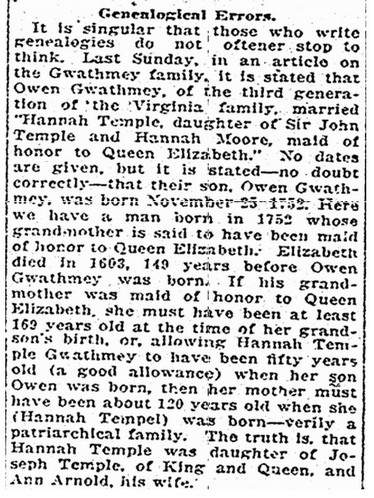
"Family history researchers are often frustrated by the mistakes of others—particularly when there is an obvious error in identity, such as the mistake explained in this 1914 Virginia newspaper article. It points out that a member of the Gwathmey family was incorrectly identified as having been a maid of honor to Queen Elizabeth.
Rchmond Times Dispatch Newspaper Gwathmey Family Genealogy
Richmond Times Dispatch (Richmond, Virginia), 17 May 1914, page 41.
This sounds like an obvious mistake, and one that could have been corrected with simple subtraction. Unfortunately, once a mistake is written in a book or newspaper article, the mistake is often carried into other research—forever frustrating the more serious genealogists.
Genealogical mistakes are not often easy to sort out, so let’s discuss some strategies.
1. Abbreviations Are Not Always What They Seem
Two of my favorites are “NA” and “NMI.”
In the case of the first abbreviation, “NA” might indicate non applicable, naturalized, Native American or even Navy, demonstrating the importance of finding the “key” explaining what an abbreviation actually means.
Another abbreviation that sometimes causes confusion is the use of “NMI” in place of a middle name. It is not an actual moniker, but rather used to indicate that a person has no middle initial—no middle name.
2. Age-Related Mistakes
  • Women who are too old to be mothers.
Although Mrs. Steve Pace, of Rose Hill, Virginia, reportedly gave birth to her 17th child in 1939 at the age of 73 (see the Wikipedia article “Pregnancy Over Age 50”), it is rare for women to give birth over the age of 50.
If a woman continued to give birth through her 40s, then it is possible that a report of her having a child as an older woman may be correct.
However, whenever you see such an older mother-child relationship claim, examine the possibility that the family may have been raising an orphan or a grandchild.
  • Persons who were born too young or old to have served during a military event.
If you are researching an ancestor for a lineage society, such as the Sons or Daughters of the American Revolution, start by figuring out the beginning and ending dates of the event.
For example, the American Civil War occurred between 1861 and 1865.
Although there are examples of very young veterans, most of the younger set did not serve in a military capacity—unless they were older. One exception was Civil War Missouri veteran George Huffman, who enrolled as a volunteer in the 13th Missouri Infantry on 4 November 1861 at the age of 14. He re-enlisted on 8 February 1864, and was considered to have been the youngest veteran to have re-enlisted that year—as explained in this 1864 Massachusetts newspaper article.

Lowell Daily Citizen & News Newspaper George Huffman Civil War


Lowell Daily Citizen and News (Lowell, Massachusetts), 2 September 1864, page 2.
For the most part, however, it is safe to assume that someone—other than a drummer or bugler—must have been at least 15 when he enlisted for combat service. Therefore, it is unlikely that a combat veteran actually served in the Civil War if he was born after the year 1850.
Now, if a child served in a non-military capacity, then you might find evidence of children as young as seven involved in a war—such as Nathan Futrell, a young boy who served in the American Revolutionary War.
Greensboro Daily News Newspaper Nathan Futrell Revolutionary War
Greensboro Daily News (Greensboro, North Carolina), 3 January 1971, page 24.
You can also apply an age factor to determine the likelihood of an older person serving in the military.

To view the rest of this article click on the link provided.

http://bit.ly/15b4z9q 

I think Mary has given us some great things to consider.  And thank you to
By for publishing it on Genealogy Bank.

Tuesday, April 30, 2013

Family Search/Family Tree~Where Is It Now?


This is the new home page of Family Search found at familysearch.org.  New versions always present new challenges but also ultimately better functionality.  It's worth it.  Repeat three times!

The page is now colorful and animated so every 2 seconds another photo flashed onto the screen that is representative of one of the six icons shown at the bottom of the screen print above.

Some of the confusion with the new update surround the fact that we once had at least nine links on the home page and now there are three large links centered on the page and then one on the right that says in small type volunteers for indexing and a help button.  As an example the all important Learn Tab is now missing!  The developers have responded to lots of inquiries about this by letting us know that when all the new languages were included if required extra space.  They gave the example of the Russian version of the site requiring three times more space than English.  All you techies will have to wrap your heads around that one.  I am taking their word for it!

Here is a short explanation of the icons on the picture above.

#1 icon highlighted in orange is where you go to create the Fan Chart on yourself or any individual you place in the center of the fan.

 #2 icon is a Camera and this is where you go to add photos and stories about your ancestors.

 #3 is the Family Tree icon where you can see your bow tie pedigree chart.  Add to it, edit it, collaborate, etc.

 #4 Is where you will be able to Search all the record collections.  It looks like the old home page but you must now go down a level or two to get there. (Bummer!)  The search boxes are located there and also the map with the collections for the various worldwide locality searching.  And this is where they have hidden placed the Wiki from the old Learn Tab.  There has been a lot of grumbling about this but they are holding fast.  They did add a Search Link at the top of the home page but are not planning on adding anything else that has been moved at this point.  The catalog for Salt Lake is there, genealogies or old member submitted pedigrees and family group sheet, and books.  That page looks very similar to what we are use to from the previous version.  We will get use to the visual enhancements and navigation issues soon enough!

One very cool thing is that they are now offering expert help for individual research problems and this offering is found in the Help Center section of the site.

 #5 All About Indexing
 #6  Live Help & The Help Center

When you click on any of the icons a large Getting Started box will pop up and guide you through the information you seek.

*****************************

The second 1/3 of the home page is currently dedicated to information on uploading photos and writing stories to attach to your ancestors individual person View in the Family Tree. 
***************************** 
The last 1/3 of the page is currently dedicated to What's New on the Site and locating the Family History Centers worldwide.


*****************************

You will note that if you are looking for the Family Search Blog with current news and updates it is a link on the bottom of the Home Page on the right.  The Help Center is accessed by clicking on the Top of any screen in the HELP link.

Here is a Look at the Learning Center Page


When you click on HELP in the upper right hand corner of any page this small pop-up lists the various types of help.  Call, Chat, Send a Message, etc.  The bottom on is the Help Center which then opens to the following page.


The first choice is Product Support.  This is where you will find answers to issues over your account, user name and password retrieval, common fixes for Family Tree problems and a 162 page User Guide for Family Tree with every possible scenario and how to remedy encountered problems.

The second choice is Getting Research Assistance that I mentioned in the search section as a new feature.

The third choices is Getting Started (for beginners).

The fourth choice is the many Online Classes and the Video Tutorials that use to be under the Learn Tab.  All the Five Minute Genealogy YouTube Videos are on this page as well.

Disclaimer:  This site has been up only a couple of weeks in its revised version.  Even as I have been working on this something has temporarily disappeared.  When it gels a little more I will make a PowerPoint on it but for now I think we'll just hold here.  I know these photos are pretty small but at least will give you an idea of what the pages look like right now. 

*****************************

Here is the long and winding path to the Family Tree Training Videos that are so helpful in learning how to use the Tree.

Help>Help Center>Product Support>Family Tree Icon>More Training Videos

This one is way too deep, hopefully they will adjust it.


Tuesday, February 12, 2013

Family Search Wiki


The most important thing you can do as a volunteer or in your calling is to know what resources are available.  This is an ongoing learning process.   One part of being good at something is keeping up with the innovations, new developments and changes.  It is great to have a niche, but you also need a broad base of understanding to help others and to learn and grow in your over all knowledge and expertise.


Our training "manual" for Family History both for members and non-members is Family Search.  I am continually astounded by the wealth of information on this website.  As I have been learning about the FS Wiki I am more impressed than ever with what it contains and the potential for it to actually help us teach others how to research and find what they are looking for.  Instead of spending an hour looking for someone's genealogical information with us at the keyboard and them watching...perhaps we should take some time and orient them to FS so they can learn the process of helping themselves.  This may be especially helpful since they can then go home and practice what we teach them on this comprehensive and free website.  If we just sit down and start looking for the patron's genealogy, their own sense of accomplishment and progression is minimal.  The satisfaction for them will increase as we teach them how to help themselves.

The other thing doing it for them does is it creates a dependency for them of having someone at their side the whole time they are seeking help.  For some people I think we only have one chance to get them interested in what we can offer them.  We want them to go home thinking their trip in to the Family Search Library was of great benefit to them.  In order for us to do that we need knowledge and experience.  Ironically, in order for them to have their best experience they need the exact same thing.  Since every research experience is different we are really all learning together.  Our job is to open their eyes and minds to the resources available.

That is what FS Wiki and the Learn Tab and the Help Screens are all about.  That is also what this staff training program is about.

The FS Wiki is like Wikipedia in some ways. The articles are contributed by individuals and by Family Search developers and experts.  All the articles are editable and easily added to by other experts in a particular field.  This is wonderful for a discipline that is ever-changing and moving forward. It is like an encyclopedia in a way, but also much more.

The Wiki contains articles about specific things like...How to Analyze Your Research, as an example.  Or defining the Genealogical Proof Standard,  which I have included below as another example.*  The Wiki  is also full of research tips specific to a localities.  Wiki is not a site for searching an individual name, perse, however you may learn something about your ancestor by searching a newspaper referenced in the Wiki from the time and place they were living.

From what I have learned so far I see it as a great way to teach patrons how to research in a locality of interest to them.  You can enter a state and find counties with an abundance of information about an area including film numbers that can be ordered from Salt Lake for various resources.  Of course this applies to other countries as well.

On the few page I have perused this week I have found that one of the nicest features is that the pages will also often include some very general information for beginners right there and links that will help them with getting started or how to write a personal for family history or get it published.  What that does is it gives them an option to move around FS and learn more so that each page is not a dead end. Brilliant!

The main thing we can do as volunteers in the Library is to familiarize ourselves with it.  The best way to do that is to spend quality time on the FS website @familysearch.org.  We need to explore the FS Wiki, watch the videos, do the tutorials and then we can truly be helpful to our patrons.  And even better than that, they will have a sense of having learned something that they can take with them when they leave that will help them in the future.  Once you know a little bit about it and then begin exploring, each new encounter for your own work or that of another person will strengthen your knowledge base.  Just the little bit of time I have spent on FS Wiki has been empowering.  Put your hands on it.  You'll be amazed.  And if you are a member of the church..pass the information on to your ward family history consultants as well.  As we share what we learn with them they will encourage others to use the family history centers...wouldn't that be great?


*Genealogical Proof Standard (From FS Wiki)


The purpose of the Genealogical Proof Standard[1] is to show the minimum genealogists must do for their work to be credible.
There are five elements to the Genealogical Proof Standard:
  1. A reasonably exhaustive search has been conducted.
  2. Each statement of fact has a complete and accurate source citation.
  3. The evidence is reliable, and has been skillfully correlated and interpreted.
  4. Any contradictory evidence has been resolved.
  5. The conclusion has been soundly reasoned.
Any proof statement is subject to re-evaluation when new evidence arises.

More information about the Genealogical Proof Standard can be found on the website of the Board for Certification of Genealogists.

Links to training materials:


From Bonnie:

"Family Search Wiki Staff Training Topic 1"

Click here to view

(Bonnie shared these files using Dropbox. Enjoy!)


© 2013 Dropbox


From Bonnie:

"Family Search Wiki Tutorial ~ Staff Training Week 1"

Click here to view

(Bonnie shared these files using Dropbox. Enjoy!)


© 2013 Dropbox